
Free 12-Month Family Budget Planner Template
Organize your family finances using free family budget planner, by Alex Bejanishvili | Updated:Get Your Family Finances Under Control with a 12-Month Planner
This spreadsheet has been designed to help you PLAN and TRACK your personal and family finances over an entire year. By focusing on the core principle of Estimated versus Actual spending, this macro-free template gives you the control you need to successfully manage your budget.
This spreadsheet helps you compare your annual budget to your actual expenditures. It is intended to be used as an annual planning and review tool, providing a detailed 12-month roadmap for your financial health.
As a preliminary caution, you should be comfortable using a spreadsheet and understand that they are somewhat error-prone. Even if the spreadsheet is completely free of errors at the time you download it, there is no guarantee that you won't accidentally introduce errors as you edit it. With that said, download and enjoy!
Family Budget Planner
for Excel 2003+, Google Sheets & OpenOffice.org Calc
Disclaimer - The spreadsheet and information on this page are for educational and illustrative purposes only. Use the information at your own risk. It is strongly advised to consult qualified professionals regarding financial decisions.
How to use a Family Budget Planner
Family Budget Planner: it is a simple template that helps to track your budget monthly, quarterly and yearly.
The family budget spreadsheet contains 3 main parts:

Income part which is comprised of the fields for projected income and for the actual income. This is usually is the first step in budgeting, since this helps to allocate amounts for the monthly spending and savings.
TIP: Always plan to spend less to gain more, in other words, to save more.

Monthly spending: I have divided an entire year into four quarters, in order to avoid possible confusion when you plan your budget. This makes things easier when entering the amounts that do not have monthly frequency, such as some subscriptions or utility bills you may receive quarterly or annual tax returns or simply any irregular payments.

Spending total and the results part: this is where you can see the estimated and actual spending for each category, including any differences and results for each quarter of the entire year. All amounts in this part of the spreadsheets are cumulative and will be updated every time you update your budget. This means that you will not have to wait for an entire year to get your budget results. In fact, obtaining information this way will help to achieve certain budget or/and saving goals.
Savings Goal is one of the latest additions to this template and our response to requests submitted by many users of our family budget planner. Savings goal helps to set specific short or long term savings goals for various purposes, track your objectives as you create your monthly budget and display all accumulated information in simple to read graphs. You can also enter any savings you have made prior to the time you began using the budget. Quarterly figures are automatically entered for you. They are copied from the Savings & Investment category of every quarter.
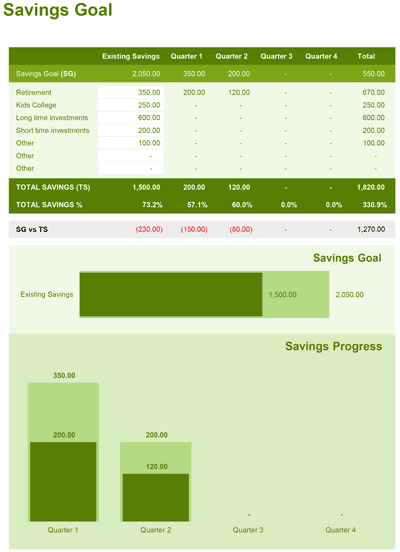
Creating a budget enables you to answer two important questions: Do I spend more than I earn? and What can I afford to spend? It can also help you identify the items and categories where you may be overspending, but, most important, this budget template can help you make future financial decisions and concentrate on savings.
Creating a Family Budget
There are two key questions that can only be answered by creating a budget.
1. Do you spend more than you earn?
Consistently spending more than you earn will lead to debt. Creating a budget will help to identify categories where you overspend.
2. What can you afford to spend?
Most of the free budget tools online are concentrating on the monthly spend, which is not exactly the right thing to do, because some of the spending may not occur monthly or even yearly, therefore this particular template is specifically concentrated on tracking your budget monthly, quarterly and annually in order to achieve greater accuracy and it gives you a holistic perspective. An accurately prepared budget can enable you to spot the categories where you may save or spend.
Important Template Cautions and Limitations
Customizing Budget Categories Safely
The calculations for the totals are based on the categories listed. You need to be careful when adding or removing categories to avoid messing up the formulas.
What you need to watch out for: If you assign a transaction to a category that is not included in the main report worksheets, the expense won't show up in your reports and you'll think you have more money than you really do. We've added conditional formatting to highlight categories not included in the main list to help prevent these types of mistakes.
No Transaction History or Bank Linking
This spreadsheet is strictly a budget planner and does not include a transaction history ledger or a checkbook register. There is also no online connectivity and no ability to import transactions from your bank or other financial institution.