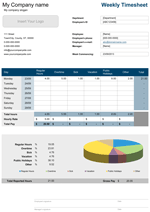
Weekly Timesheet with Breaks
Keep track of hours of work before and after breaks with this timesheet - by Alex BejanishviliAre you looking to manage time and improve the productivity of your team?
Spreadsheet123 helps you managing the employee time and attendance information. You can clock employees in and out time, before and after break, in an organized manner. It helps you record information about vacations, overtime, sick hours etc. This weekly timesheet template automatically adds an hour when calculating the final worked hours and generating the pays. We know that the basic hours worked are not the exact hours that could include the overtime therefore total basic hours worked minus the overtime gives the basic hours for the week. The template comes with four kinds of worksheets:
- Weekly Timesheet (Decimal Format)
- Biweekly Timesheet (Decimal Format)
- Weekly Timesheet (HH:MM)
- Biweekly Timesheet (HH:MM)
This amazingly effective and productive template is suitable for all kinds of firms and is a boon to the companies which calculate the gross pay on the basis of the number of hours worked along with the overtime calculations. It excludes lunch hours from the regular hours.
Timesheet with Breaks
for Excel 2003+ & Google Sheets
Using this Weekly Timesheet
Weekly Timesheet with Breaks is an easy to use template that can be used to record and calculate the billable and non-billable hours from net hours worked. The template has a 'Settings' sheet that is been divided into sections:
- Company Details: here you can record the Company name and slogan. You can choose to enable or disable these details in other worksheets
- Company Address: here you can record the official address of the company with phone number, email, website address.
- Country Specific Settings: here you can select a currency from the drop down menu that would be used for gross pay calculations
- Colour Scheme: is a design picker that can be used to change the colour of the timesheet. You can choose the one that suits your company's logo or business stationary.
Spreadsheet123 offers two different types of time tracking formats that are weekly and biweekly. The weekly sheet stores the hours worked information in a decimal format whereas the biweekly timesheet store time in hourly format. As per your requirement you can use the page that best suits you. Out of the four main timesheets two (weekly and biweekly) use a decimal format and the remaining two sheets (weekly and biweekly) use the HH:MM format of time capturing.
In all the worksheets, first sections publishes the company name, slogan, company address and logo along with the other basic details which are:
- Department Name - stores the name of the department that the employee belongs to
- Employee ID - there is a unique Id that is linked to each employee
- Employee Name - enter the name of the employee
- Employee phone No. - to be able to contact the employee if required
- Employee Email - mail communication can be easily setup
- Manager - manager name whom the employee reports to
- Week Commencing - date of the day which would be the first day of the week
Before recording the time worked we need to enter the Basic hours (Daily and Weekly both) value, this would be the reference value for all payroll calculations. Select a method for calculating overtime. It has three options:
- Off daily Basic hours - As hours above the daily minimum hours specified
- Off weekly Basic hours - As hours above the daily minimum hours specified
- Add to the basic hours - As basic hours.
The middle part of the sheet has a weekly timesheet that maintains the Time In - Time Out information of the employee both before and after breaks. Difference in the In and Out time before break is auto-computed and stored under the totals column. Similarly the after break time is calculated. Adding both the before break total hours and the after break total hours give us the total hours worked. If the net total hours are greater than the basic hours then subtract the basic hours from the total hours. The balance hours left are the overtime hours and would be entered. Entries for other hour types are also available like sick, vacation and holidays.
Once the hours spent for the entire week under each category (Basic hours, Holidays, Overtime, Sick and Vacation) are known. Specify the hourly rate under each category and the Total Pay earned by each is generated. The total pay under each category is calculated separately and the sum total of the Gross pay is published under the Grand Total Pay along with the Total Reported Hours.
The weekly sheet calculates the results for a single week but the biweekly sheet has table showing two weeks and the grand total pay is also calculated for 15 days. Under the decimal timesheet the time worked is stored in a decimal format meaning that a two and a half hour of work will be published as 2.50 but in the HH:MM format it will be published as 02:30.
The last part of the timesheet displays a doughnut graph which depicts the percentage breakage of the Basic hours, Overtime, Sick, Vacation and Holidays hours. For easy interpretation of the graph, each hour type has been awarded a different color. The work efficiency and productivity of the employee can be simply being judged just looking at this graph. If the sick, vacation, holiday, percentage is more than the regular and overtime hours then it gives a clear picture dependability and commitment. The timesheet not only enables to track time but also helps to calculate the pay of an employee.
The printable timesheet can be sent to the manager for approval and could also be mailed to the manager. The sheet can be signed and counter signed by the manager to approve the contents. The sheet is very effective and reliable to handle all your time relating worries. It truly stands by the common saying - "Time is Money".
We recommend you not to change or delete the pre-defined formulas of the template. By doing so the entire template would get altered as the various fields have interconnected formulas and the results in such a scenario would be doubtful.
Function used in template
- IF (logical_test, [value_if_true], [value_if_false])
- SUM(number1, [number2], [number3], [number4], ...)
- TODAY()